
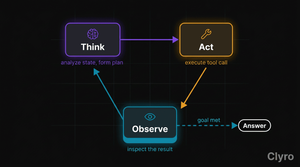
How AI agent reasoning actually works: the Think, Act, Observe loop explained with code, failure points at each stage, and why traces miss what matters.
1. The Crisis: Why "Traces" Miss the Point
Open LangSmith after your agent does something wrong. You see a hierarchical tree of spans — every LLM call, tool invocation, intermediate step, with timestamps and token counts. Organized. Thorough. And it won't tell you why the agent made the decision it made.
Not a criticism of LangSmith — a structural limitation of span-based tracing. OpenTelemetry spans were designed for request-response systems (web servers, microservices, DBs) that answer "what happened?" and "how long?" Right questions for a REST API. Wrong questions for an autonomous agent.
An agent doesn't just execute steps — it reasons between them. Evaluates its own output. Decides whether to continue, retry, or change strategy. Weighs which tool, which parameters, based on the last observation. None of that reasoning appears in a span.
Concrete example. A customer support agent processes a refund. The trace:
Span 1: LLM call (420ms, 1,200 tokens)
Span 2: Tool call → lookup_order (85ms)
Span 3: LLM call (380ms, 900 tokens)
Span 4: Tool call → process_refund (120ms)
Clean. Four spans. All succeeded. But the agent refunded $247 instead of the $47 owed. The trace shows that the refund processed. It doesn't show why the agent decided on $247 — hallucinated total? Misread tool response? Applied a nonexistent "full refund" policy?
The reasoning happened between the spans. Spans are bones; reasoning is muscle.
LangSmith's own engineering team acknowledges the gap: "Deep agents can run for dozens if not hundreds of steps. When presented with such a large trace, there is simply more content for a human to parse through to find meaningful sections." [Source: LangChain Blog] Arize Phoenix's Agent Graph abstracts spans into node visualizations that help identify loops and bottlenecks — but the core challenge remains: structure, not logic. [Source: Arize]
To debug agents, you need the reasoning loop itself. It has a name, a structure, a documented history. It's called Think→Act→Observe (also known as the agentic loop or reasoning loop).
2. How Does AI Agent Reasoning Work?
Princeton and Google published "ReAct: Synergizing Reasoning and Acting in Language Models" in October 2022. Core idea: instead of having an LLM either reason (chain-of-thought) or act (call tools), interleave both — reason, act, reason about the result. [Source: Yao et al., arXiv:2210.03629]
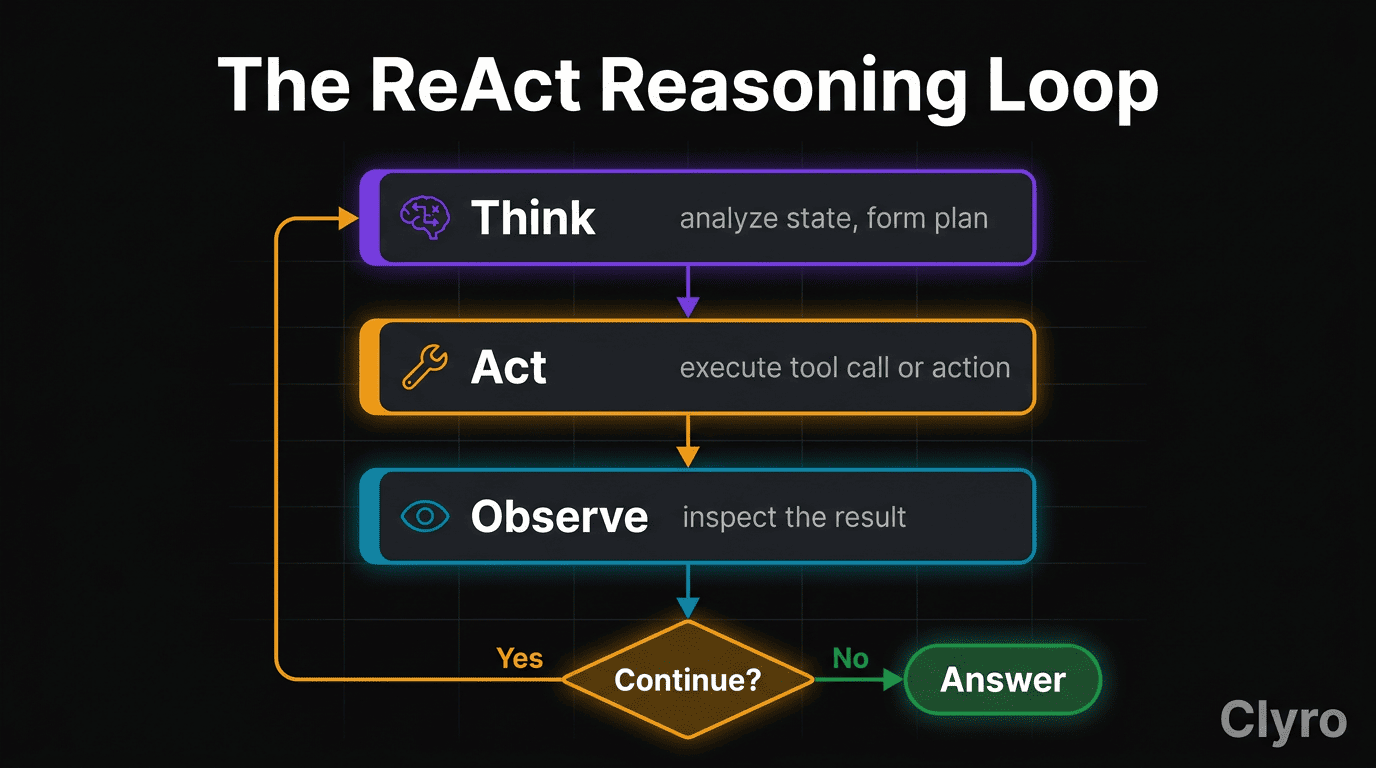
Three-stage loop:
  THINK  ──►  ACT  ──►  OBSERVE  ──► Continue?
    ▲                                    │
    └────────── Yes ─────────────────────┤
                                         │ No
                                         ▼
                                      ANSWER
# Three-stage cycle: Think (plan) → Act (execute) → Observe (inspect) → loop or answer.
# ... full bordered ASCII diagram with per-stage captions in collapsed block below
View full loop diagram
┌─────────────────────────────────────────┐
│                                         │
│   ┌─────────┐                           │
│   │  THINK  │  Analyze state, form plan │
│   └────┬────┘                           │
│        │                                │
│        ▼                                │
│   ┌─────────┐                           │
│   │   ACT   │  Execute tool / action    │
│   └────┬────┘                           │
│        │                                │
│        ▼                                │
│   ┌─────────┐                           │
│   │ OBSERVE │  Inspect result           │
│   └────┬────┘                           │
│        │                                │
│        ▼                                │
│   Continue?───── Yes ───► Back to THINK │
│        │                                │
│        No                               │
│        │                                │
│        ▼                                │
│   ┌──────────┐                          │
│   │  ANSWER  │  Return final response   │
│   └──────────┘                          │
│                                         │
└─────────────────────────────────────────┘
Think — The agent examines state (user request, history, prior results) and produces a reasoning trace — a natural-language plan. Decides which tool, what parameters, why this moves toward the goal. Planning step.
Act — The agent executes the Think-stage decision. Calls a tool, queries an API, runs a DB lookup. The only stage that touches the external world. Execution step.
Observe — The agent inspects the tool response, checks for errors, updates state. Feeds back into the next Think. Evaluation step.
The loop repeats until the agent has enough information to produce a final answer — or an external constraint (step limit, cost bound, timeout) stops it.
Every major agent framework implements this. LangGraph wires it as a state graph with conditional edges. CrewAI wraps it in an execution engine with configurable max_reasoning_attempts and max_execution_time. Even from-scratch agents using raw API calls implement Think→Act→Observe — named or not.
The ReAct paper demonstrated this across four benchmarks: HotPotQA (QA), Fever (fact verification), ALFWorld (text games), WebShop (web navigation). Interleaving reasoning with action outperformed either reasoning-only or action-only in every case — absolute success-rate gains of +34% on ALFWorld and +10% on WebShop over act-only baselines. Not an abstraction — the empirically validated mechanism by which agents solve multi-step problems.
3. What Happens at Each Stage
Best way to understand the loop: build it. Below is a minimal but complete ReAct agent in Python — OpenAI API, two tools, full Think→Act→Observe cycle.
Setup and Tools
import openai, json
client = openai.OpenAI()

def lookup_order(order_id: str) -> dict:
    """Retrieve order details from the database."""
    # Simulated: 2 sample orders; returns {error} if not found.
    ...

def process_refund(order_id: str, amount: float) -> dict:
    """Process a refund (caps: amount > 0, amount ≤ $500 else manual approval)."""
    ...

TOOLS = {"lookup_order": lookup_order, "process_refund": process_refund}
# ... full tool bodies + sample order data in collapsed block below
View full tool definitions
import openai
import json

client = openai.OpenAI()

# --- Define tools the agent can use ---

def lookup_order(order_id: str) -> dict:
    """Retrieve order details from the database."""
    # Simulated database lookup
    orders = {
        "ORD-1042": {"customer": "Jane Chen", "items": ["Widget A", "Widget B"],
                      "total": 47.00, "status": "delivered"},
        "ORD-1043": {"customer": "Mike Rao", "items": ["Gadget X"],
                      "total": 129.99, "status": "in_transit"},
    }
    return orders.get(order_id, {"error": f"Order {order_id} not found"})


def process_refund(order_id: str, amount: float) -> dict:
    """Process a refund for a given order."""
    if amount <= 0:
        return {"error": "Refund amount must be positive"}
    if amount > 500:
        return {"error": "Refunds over $500 require manual approval"}
    return {"status": "processed", "order_id": order_id,
            "refunded": amount, "method": "original_payment"}


# Map tool names to functions
TOOLS = {
    "lookup_order": lookup_order,
    "process_refund": process_refund,
}
The Tool Schema
TOOL_SCHEMAS = [
    {"type": "function", "function": {
        "name": "lookup_order",
        "parameters": {"type": "object",
            "properties": {"order_id": {"type": "string"}},
            "required": ["order_id"]}}},
    {"type": "function", "function": {
        "name": "process_refund",
        "parameters": {"type": "object",
            "properties": {"order_id": {"type": "string"},
                           "amount": {"type": "number"}},
            "required": ["order_id", "amount"]}}}]
# ... descriptions + parameter docstrings expanded in collapsed block below
View full tool schemas
TOOL_SCHEMAS = [
    {
        "type": "function",
        "function": {
            "name": "lookup_order",
            "description": "Look up order details by order ID.",
            "parameters": {
                "type": "object",
                "properties": {
                    "order_id": {"type": "string", "description": "The order ID, e.g. ORD-1042"}
                },
                "required": ["order_id"],
            },
        },
    },
    {
        "type": "function",
        "function": {
            "name": "process_refund",
            "description": "Process a refund for an order.",
            "parameters": {
                "type": "object",
                "properties": {
                    "order_id": {"type": "string", "description": "The order ID"},
                    "amount": {"type": "number", "description": "Refund amount in dollars"},
                },
                "required": ["order_id", "amount"],
            },
        },
    },
]
The Loop
def run_agent(user_message: str, max_steps: int = 10) -> str:
    messages = [{"role": "system", "content": "..."},
                {"role": "user", "content": user_message}]
    for step in range(max_steps):
        # THINK — LLM picks a tool call or produces the final answer
        resp = client.chat.completions.create(
            model="gpt-4o", messages=messages, tools=TOOL_SCHEMAS)
        msg = resp.choices[0].message
        messages.append(msg)
        if not msg.tool_calls:
            return msg.content
        # ACT + OBSERVE — execute each tool call, feed result back
        ...
# ... full system prompt + per-step ACT/OBSERVE logic + example invocation in collapsed block below
View full Think→Act→Observe loop
def run_agent(user_message: str, max_steps: int = 10) -> str:
    """
    Run the Think→Act→Observe loop.

    max_steps: hard limit on iterations to prevent runaway execution.
    """
    messages = [
        {"role": "system", "content": (
            "You are a customer support agent. You can look up orders "
            "and process refunds. Always verify order details before "
            "processing any refund. Never refund more than the order total."
        )},
        {"role": "user", "content": user_message},
    ]

    for step in range(max_steps):
        # ── THINK ──────────────────────────────────────────────
        # The LLM examines the conversation state and decides
        # what to do next: call a tool, or produce a final answer.
        response = client.chat.completions.create(
            model="gpt-4o",
            messages=messages,
            tools=TOOL_SCHEMAS,
            tool_choice="auto",
        )
        assistant_msg = response.choices[0].message
        messages.append(assistant_msg)

        # If no tool calls, the agent has produced a final answer.
        if not assistant_msg.tool_calls:
            return assistant_msg.content

        # ── ACT ────────────────────────────────────────────────
        # Execute each tool the agent decided to call.
        for tool_call in assistant_msg.tool_calls:
            fn_name = tool_call.function.name
            fn_args = json.loads(tool_call.function.arguments)

            print(f"  [Step {step + 1}] ACT: {fn_name}({fn_args})")

            if fn_name not in TOOLS:
                result = {"error": f"Unknown tool: {fn_name}"}
            else:
                result = TOOLS[fn_name](**fn_args)

            # ── OBSERVE ────────────────────────────────────────
            # Feed the tool result back into the conversation.
            # The agent will inspect this on the next THINK step.
            tool_result = json.dumps(result)
            messages.append({
                "role": "tool",
                "tool_call_id": tool_call.id,
                "content": tool_result,
            })
            print(f"  [Step {step + 1}] OBSERVE: {tool_result}")

    return "Agent reached maximum steps without completing the task."


# --- Run it ---
answer = run_agent("I need a refund for order ORD-1042. The Widget B was damaged.")
print(f"\nFinal answer: {answer}")
Expected Output
  [Step 1] ACT: lookup_order({"order_id": "ORD-1042"})
  [Step 1] OBSERVE: {"customer": "Jane Chen", "items": ["Widget A", "Widget B"],
                      "total": 47.0, "status": "delivered"}
  [Step 2] ACT: process_refund({"order_id": "ORD-1042", "amount": 47.0})
  [Step 2] OBSERVE: {"status": "processed", "order_id": "ORD-1042",
                      "refunded": 47.0, "method": "original_payment"}

Final answer: I've processed a full refund of $47.00 for order ORD-1042.
The refund will be applied to your original payment method.
Two iterations, two tool calls: Step 1 — thinks "verify first", acts via lookup_order, observes details. Step 2 — thinks "refund now", acts via process_refund, observes success. Then the final answer.
What Makes This Different From a Simple Chain
A chain runs a fixed sequence — predetermined. Think→Act→Observe is dynamic: the agent decides at each Think whether to continue, which tool, what parameters. If lookup_order errors, the agent observes the error and thinks about what to do next (retry with different ID, ask user, give up). A chain just fails at step 1. Adaptability makes agents powerful — and hard to debug.
4. Where Does AI Agent Reasoning Break Down?
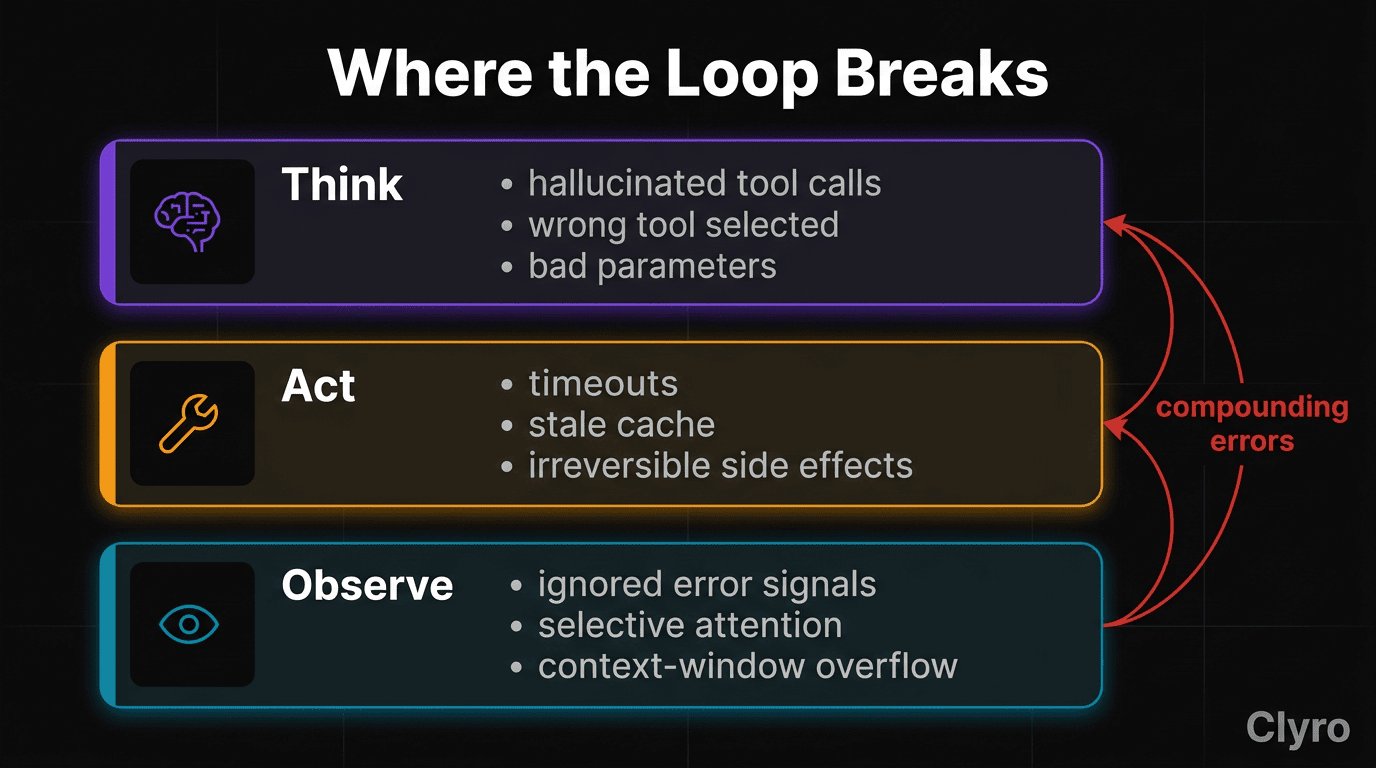
Each stage has its own failure modes. Understanding origin is the first step toward prevention.
Think Failures: The Agent Plans Wrong
Think fails when reasoning is flawed — wrong tool, wrong parameters, misinterpreted request — all before any external action.
Hallucinated tool calls. The agent invents a tool that doesn't exist, or passes parameters that don't match the schema. With 50+ tools in context, confusion increases — wrong parameters or wrong tool entirely. [Source: Philipp Schmid]
Wrong tool selection. User asks "what's my order status?" → agent calls process_refund instead of lookup_order. Trace shows a successful tool call to the wrong tool. You won't catch this until the refund clears.
Incorrect parameter construction. Right tool, wrong arguments. Date formatted MM/DD/YYYY when API expects YYYY-MM-DD. Trace shows a tool error; root cause is Think, not the tool.
# Think failure example: agent constructs wrong parameters
# The agent reasons: "I should look up order 1042"
# But it formats the ID wrong:

tool_call_args = {"order_id": "1042"}  # Missing "ORD-" prefix
# lookup_order returns: {"error": "Order 1042 not found"}
# Agent retries with "1042" again. And again. Loop begins.
Prevention: Validate parameters against schemas before execution. Hard limit on consecutive failed tool calls (3 is reasonable). Log the reasoning trace — not just the call — so you can see why it chose the wrong tool.
Act Failures: The Execution Goes Wrong
Act fails when the tool call produces an unexpected result even though reasoning was sound.
Timeouts and errors. External APIs go down, DB queries time out. Plan was right; infrastructure wasn't. Without proper error handling, the agent may retry indefinitely.
Stale or incorrect responses. The tool returns wrong data — yesterday's cache, irrelevant search results. Agent proceeds with bad input, unaware.
Side effects without confirmation. The agent calls process_refund and the refund clears — but Think hadn't confirmed the amount. Irreversible actions on flawed reasoning are the most dangerous Act failures.
# Act failure example: irreversible action on bad reasoning

# Think: "Customer wants refund for ORD-1042, total is $247"
# (Wrong — agent hallucinated the total. Actual total is $47.)

process_refund(order_id="ORD-1042", amount=247.00)
# Returns: {"status": "processed", "refunded": 247.00}
# The refund succeeded. The trace shows success. The amount is wrong.
Prevention: Require confirmation for high-impact actions (refunds >$100, DB writes, external side effects). Cost bounds — hard ceiling per execution. For the code above, a business-logic guardrail checking refund_amount <= order_total catches the error before execution.
Observe Failures: The Agent Misreads the Result
Observe fails when the agent misinterprets a correct tool response. The most subtle mode — tool worked, result accurate, conclusion wrong.
Ignoring error signals. Tool returns {"status": "partial", "warning": "only 2 of 3 items eligible"}; agent treats as full success and tells the customer the order was refunded.
Selective attention. Tool returns JSON with 15 fields; agent latches on one and ignores others — sees "status": "delivered" but misses "return_window_expired": true.
Context window overflow. After 10+ iterations, history grows; attention to earlier observations degrades. Agent re-asks questions it already answered or contradicts earlier findings. Stanford/UC Berkeley documented this in GPT-4 over time. [Source: Chen et al., arXiv:2307.09009]
# Observe failure example: agent misreads a tool response

tool_response = {
    "customer": "Jane Chen",
    "items": [
        {"name": "Widget A", "price": 22.00, "refundable": True},
        {"name": "Widget B", "price": 25.00, "refundable": False},  # Non-refundable
    ],
    "total": 47.00,
}

# Agent observes: "Order total is $47, I'll refund $47"
# Agent missed: Widget B is non-refundable. Correct refund is $22.
Prevention: Structure tool responses so critical fields are obvious. Use explicit boolean flags (refundable, eligible, within_window) rather than expecting the agent to infer from raw data. Log the agent's interpretation of each observation — not just the raw response.
The Compounding Problem
These failures don't stay isolated. A Think failure leads to a bad Act, produces a misleading Observe, feeds a worse Think next iteration. "A small error in an early step can cascade into a complete failure at the end." [Source: Softcery]
Each iteration compounds uncertainty. At 5% error per step, 12 steps have 46% cumulative failure probability; 20 steps, 64%. The loop that makes agents powerful is the same loop that makes them fragile.
| Steps | Per-Step Accuracy | Cumulative Success Rate |
|---|---|---|
| 1 | 95% | 95.0% |
| 5 | 95% | 77.4% |
| 10 | 95% | 59.9% |
| 20 | 95% | 35.8% |
| 50 | 95% | 7.7% |
This is why step limits matter. A 100-step limit isn't a restriction — it's a circuit breaker.
5. How to Visualize Reasoning
The gap between traces and reasoning isn't inevitable. It requires a different visualization approach.
What Traces Show You
Standard tools (LangSmith, Arize Phoenix, Langfuse) show the structure of execution:
Trace #a1b2c3
├── LLM Call      [420ms, 1200 tokens, $0.018]
├── Tool: lookup_order  [85ms]
├── LLM Call      [380ms, 900 tokens, $0.014]
└── Tool: process_refund  [120ms]
Four steps, 1,005ms total, $0.032 spent. Doesn't tell you what the agent was thinking between steps.
What Reasoning Replay Shows You
Reasoning replay captures the loop as a first-class concept:
Iteration 1
├── THINK:   "Verify the order before refunding."
├── ACT:     lookup_order(order_id="ORD-1042")
└── OBSERVE: Order found. Total: $47.00. Status: delivered.

Iteration 2
├── THINK:   "Order verified. Refund full $47.00."
├── ACT:     process_refund(order_id="ORD-1042", amount=47.00)
└── OBSERVE: Refund processed. $47.00 returned via original payment.

ANSWER: "I've processed a full refund of $47.00..."
# ... full reasoning-replay with natural-language Think captions in collapsed block below
View full reasoning replay
Iteration 1
├── THINK: "User wants a refund for ORD-1042. I need to verify
│          the order exists and check the refund eligibility
│          before processing anything."
├── ACT:   lookup_order(order_id="ORD-1042")
└── OBSERVE: Order found. Customer: Jane Chen. Total: $47.00.
             Status: delivered. All items refundable.

Iteration 2
├── THINK: "Order verified. Total is $47.00. User reported Widget B
│          was damaged. I should refund the full order amount since
│          the items were delivered and the damage is confirmed."
├── ACT:   process_refund(order_id="ORD-1042", amount=47.00)
└── OBSERVE: Refund processed. $47.00 returned via original payment.

ANSWER: "I've processed a full refund of $47.00..."
Traces are a flat list of spans; reasoning replays are a sequence of decisions. Each iteration shows what the agent believed (Think), what it did (Act), what it learned (Observe). You can pinpoint exactly which iteration went wrong and which stage was the root cause.
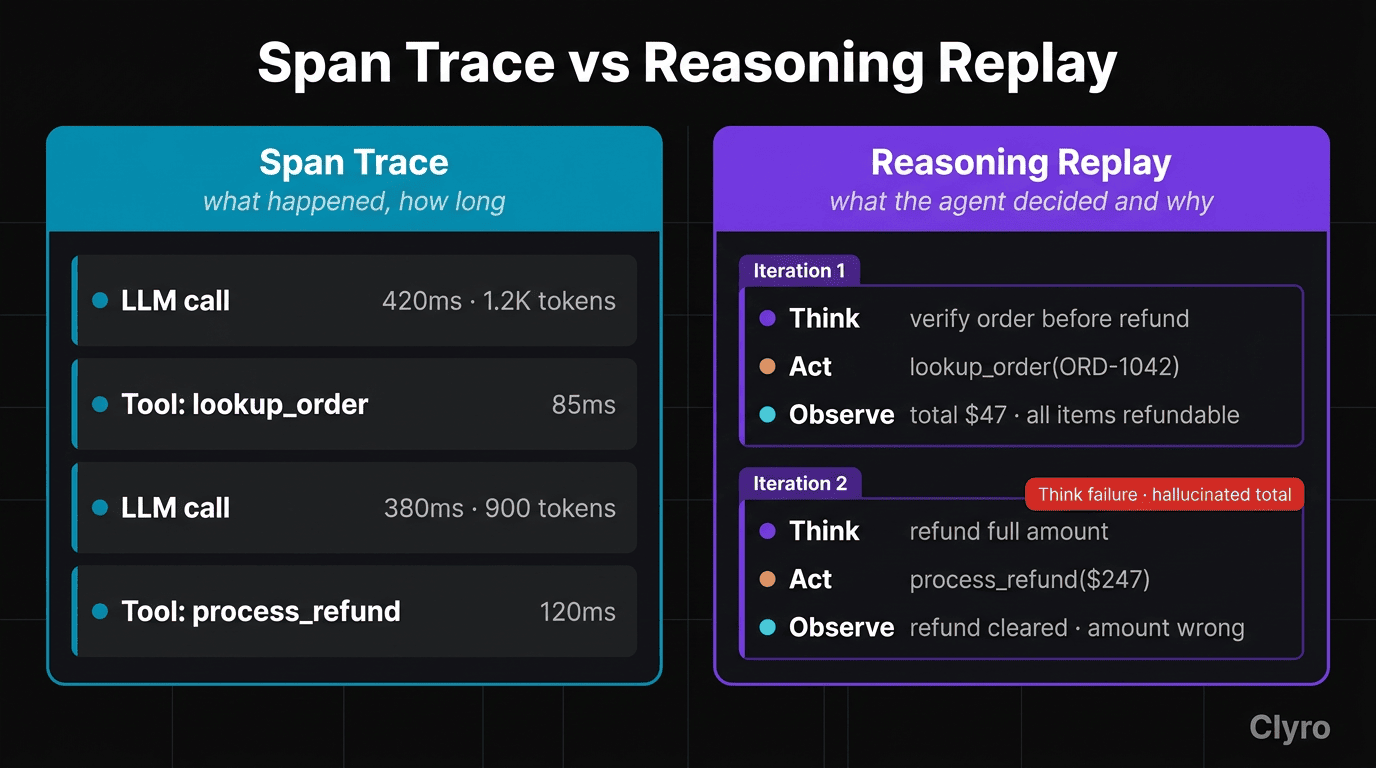
For the $247 refund error from §4: a standard trace shows a successful process_refund call; a reasoning replay shows the Think step where the agent hallucinated the order total — the exact moment the error was introduced, before any action was taken.
Clyro's approach treats each iteration as a structured decision record (reasoning + action + observation + goal evaluation), not a flat span. Implementation uses hierarchical tracing: each Think→Act→Observe cycle is a parent event with three children. You navigate a decision tree, not flat logs. The loop becomes a traceable, replayable artifact.
6. Resolution
Think→Act→Observe isn't a framework feature — it's the fundamental mechanism every agent operates on. LangGraph expresses it as a state graph. CrewAI wraps it in an execution engine. ReAct formalized it. The loop exists whether you name it or not.
Understanding it changes how you debug. Instead of scanning trace logs for failed spans, you ask: which iteration went wrong, and which stage — Think (bad reasoning), Act (bad execution), or Observe (bad interpretation)? Each has a different fix.
Understanding it also changes how you build. Each stage is a point where runtime governance can be applied — a guardrail in the execution path, not an alert after the fact:
| Stage | Guardrail | What It Prevents |
|---|---|---|
| Think | Parameter validation, schema checks | Hallucinated tool calls, wrong parameters |
| Act | Cost bounds, confirmation gates, business logic rules | Irreversible bad actions, runaway spending |
| Observe | Step limits, loop detection, context window management | Compounding errors, infinite loops |
The Prevention Stack maps directly. Loop detection (3 iterations) catches cycles not making progress. Cost bounds ($10/execution) halt Act-stage spend accumulation. Step limits (100 steps) prevent compounding errors from exceeding safe iteration counts. Business-logic guardrails intercept Act steps that violate constraints — refunding more than the order total, or ordering 260 McNuggets.
Human-in-the-loop (HITL) or human-on-the-loop checkpoints layer on top: require explicit approval before high-blast-radius Act steps (refunds above a threshold, outbound communications, schema-altering operations), or surface the Think trace to a reviewer for periodic spot-checks. Automated guardrails cover the common case at machine speed; HITL covers the consequential case at human judgment.
What to implement first
- Add step limits today — 100 is a reasonable start
- Log the Think step explicitly, not just Act/Observe artifacts
- Validate parameters at the Act boundary before execution
- Set a cost ceiling per execution before your first production deployment
This is the foundation of the Agent Kernel — a runtime governance layer that treats each iteration as a governed decision point, not a logged event. Agents aren't black boxes. They're loops. Once you can see the loop, you can see the reasoning. Once you can see the reasoning, you can govern it.
Get Started
Install the SDK and add runtime governance to your agents in under a minute.
pip install clyro
Free tier: 10 agents, 100K traces/month, no credit card required.
Works with LangGraph, CrewAI, Claude Agent SDK, Anthropic SDK, and any Python callable.
Sign Up Free → | GitHub → | Docs →
FAQ
What is the Think→Act→Observe loop?
The universal reasoning pattern every AI agent runs on — LangGraph, CrewAI, or raw API calls. Three stages: Think (examine state, plan next action), Act (execute the plan — tool call, API, DB), Observe (inspect the result, feed into next Think). Repeats until the agent answers or hits an external constraint. Formalized in the 2022 ReAct paper (Yao et al., arXiv:2210.03629).
Why can't LangSmith traces tell me why my agent made a decision?
Span-based tracing records actions, not reasoning. OpenTelemetry spans were designed for deterministic request-response systems. An agent reasons between spans — choosing tools, interpreting instructions, deciding to retry or escalate. LangSmith's own team: "Deep agents can run for dozens if not hundreds of steps." Spans are bones; reasoning is muscle. To debug, you need the reasoning in the Think step that preceded each action.
How is a ReAct agent different from a simple chain?
A chain runs a predetermined sequence: step 1, 2, 3, done. Order fixed. A ReAct agent is dynamic — Think decides at each iteration whether to continue, which tool, what parameters. When a tool errors, a chain stops; ReAct observes, thinks, and might retry differently, switch strategies, or ask the user. Adaptability is what makes agents powerful and hard to debug.
Where do agents most commonly fail in the Think→Act→Observe loop?
Each stage has its own mode. Think failures: hallucinated tool calls, wrong tool (calling process_refund when asked about status), bad parameters (wrong date format). Act failures: timeouts, stale cache, side effects before confirmation (a $247 refund before amount verified). Observe failures: ignoring error signals, selective attention, context-window degradation. Think needs parameter validation; Act needs cost bounds and confirmation gates; Observe needs structured responses and reasoning logs.
Why do cumulative errors matter for multi-step agents?
Each step multiplies failure probability. At 95% per-step success: 5 steps → 77.4%, 10 → 59.9%, 20 → 35.8%, 50 → 7.7%. Per-step reliability looks great on dashboards; end-to-end success collapses as step count grows. Step limits aren't arbitrary restrictions — they're circuit breakers bounding the compounding-error domain.
Can I implement Think→Act→Observe without LangGraph or CrewAI?
Yes. §3 shows a full ReAct agent in ~60 lines of Python using only the OpenAI SDK — no framework, no graph abstraction. A for loop bounded by max_steps, tools as plain functions, schemas as a JSON list, Observe implemented by appending tool results to message history. Frameworks add convenience (state management, parallel calls, HITL hooks) — not the pattern. Understand the loop and you can debug any implementation.
How do I add runtime governance to a Think→Act→Observe loop?
Guardrails per stage. Think: validate parameters against schemas; log reasoning trace, not just the tool call. Act: require confirmation for irreversible actions; enforce cost bounds per execution; check business-logic rules (refund_amount <= order_total). Observe: step limits, loop detection for structural repetition, context-window management. Together these form the Prevention Stack — governance in the execution path, not alerts after damage.
Related Resources
- The 5 Agent Failure Modes — The taxonomy of production agent failures, mapped to loop stages
- The $47K Loop: A Forensic Analysis — What happens when the loop runs without bounds
- The Prevention Stack: Beyond Observability — The four-component framework for runtime governance
- 260 McNuggets: When AI Orders for You — An Act failure in the wild — no business logic guardrails
Sources
[1] Yao et al., "ReAct: Synergizing Reasoning and Acting in Language Models," ICLR 2023 — Original paper defining the Think-Act-Observe reasoning pattern. https://arxiv.org/abs/2210.03629
[2] Google Research Blog — ReAct — Google's summary of the ReAct research. https://research.google/blog/react-synergizing-reasoning-and-acting-in-language-models/
[3] LangChain Blog — Debugging Deep Agents with LangSmith — LangSmith team on trace limitations for deep agents. https://blog.langchain.com/debugging-deep-agents-with-langsmith/
[4] Arize — Agent Observability and Tracing — Arize Phoenix agent graph visualization approach. https://arize.com/ai-agents/agent-observability/
[5] Chen et al., "How Is ChatGPT's Behavior Changing Over Time?", Stanford/UC Berkeley, July 2023 — Context window degradation and model behavior drift study. https://arxiv.org/abs/2307.09009
[6] Philipp Schmid — "Context Engineering for AI Agents: Part 2" — Tool call hallucination patterns with large tool sets. https://www.philschmid.de/context-engineering-part-2
[7] Dylan Castillo — "Building ReAct agents with (and without) LangGraph" — Practical ReAct implementation reference. https://dylancastillo.co/posts/react-agent-langgraph.html
[8] Softcery — "Production AI Agent Observability Guide" — Error cascading patterns in agent loops. https://softcery.com/lab/you-cant-fix-what-you-cant-see-production-ai-agent-observability-guide